
01
Watch
Short lessons introduce the business concept, the AI workflow, and the assignment ahead.
Understand the task and what good work requires.
New article
Venture in a Box for student founders: a company-building system
PlanAI gives universities and training programs lessons, timed scenarios, and submissions faculty can grade.
Learning materials are the file path. The assignment is the submission. A passing grade opens the next module.
Short lessons introduce the business concept, the AI workflow, and the assignment ahead.
Understand the task and what good work requires.
PDF guides, industry cases, and worked examples give learners a basis for their decisions.
Ground an argument in relevant evidence.
Apply concepts in business models, financial scenarios, strategic analysis, and timed challenges.
Produce work that can be submitted and assessed.
Use AI for explanations, critique, and alternative approaches while developing a response.
Question assumptions and explain the final judgment.
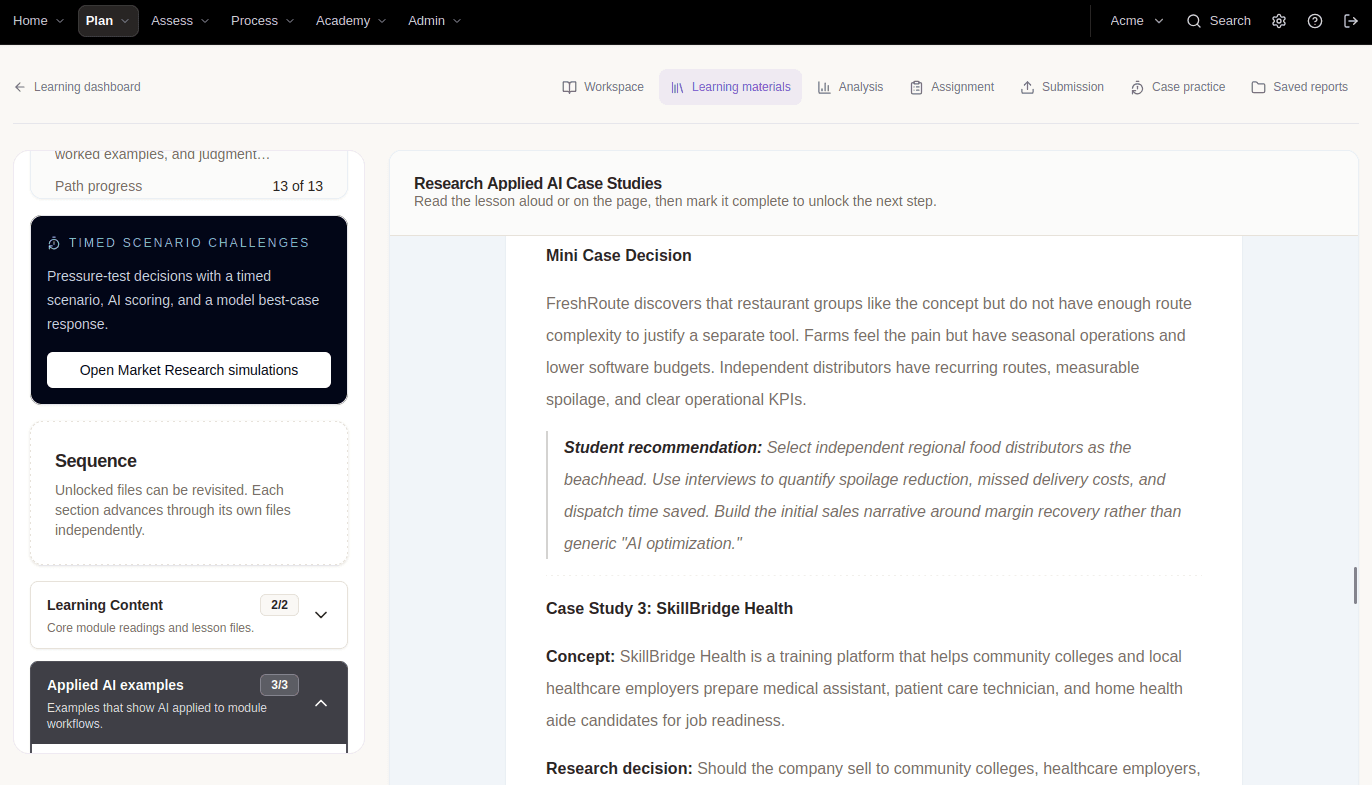
A sequenced learning path
Move through videos, PDFs, examples, and activities in an ordered content rail.
Visible completion and milestones
File completion stays on the materials page. A passing grade opens the next module.
Timed scenario practice
Apply a concept in a timed challenge and get AI feedback tied to the rubric.
The outcome
Learners can see what to do next. Faculty can distinguish participation from the quality of the work students submit.
Use assignment rubrics to examine evidence, analysis, and recommendations. Give students specific feedback they can act on, with instructor tools to review and grade the work.
Criteria tied to the task
Module-specific rubrics define weighted criteria, a passing threshold, and what the student is expected to submit.
Feedback that explains the score
AI-assisted evaluations identify strengths, evidence gaps, and revision guidance for each criterion.
Faculty review and progression
Instructors can inspect submissions, enter grades and feedback, and manage progression into the next module.
The outcome
A record of the score, the missing evidence, and what to revise next.
Generic template
Sample feedback
“Support the target-market estimate with a source, explain the assumptions, and show how a smaller market changes your recommendation.”
Illustrative feedback · Criteria and thresholds vary by assignment.
Keep course materials, assignments, and submission review in one place. Organize them by program and use submitted work to see who needs help.
Organize and publish resources
Upload PDFs and videos, group materials by module, and manage draft and published content.
Set the assignment and review submissions
Define the task and rubric, then review submitted work, grades, and feedback from the faculty workspace.
Follow up with learners
Use progress, submission status, and student interactions to identify where additional guidance is needed.
The outcome
Faculty can connect what they teach to what students submit and use that evidence to focus their feedback.
One course structure
Learning content
Core concepts, lessons, and reference guides
Applied AI examples
Worked examples connected to business tasks
Industry case studies
Context for comparing decisions and tradeoffs
Responsible AI judgment
Practice evaluating AI outputs and their limitations
Instructor content
Facilitation guides and teaching resources
Learner materials and instructor resources share an organized structure, with access governed by role and publication status.
Connect PlanAI activities to your campus LMS through LTI 1.3. Scope course launches, assignment links, and grade passback with IT so applied learning fits the existing course workflow.
Open the course assignment
Carry verified course context
Practice, submit, and review
Return the score through AGS
Open a PlanAI activity from an LMS course with the relevant course and learner context.
Students enter the assigned activity from their familiar course environment.
Select a PlanAI module when creating an LMS activity or assignment.
Faculty can connect the right applied task to the right point in the syllabus.
Return scores from graded submissions to the LMS gradebook through AGS.
Keep assessment results connected to the course grading workflow.
Scope NRPS course membership and role mapping with your LMS administrator.
Agree on roster handling during the pilot; live roster sync requires validation.
Start with your LMS and a test course.
Canvas and Blackboard have dedicated configuration paths. Moodle, Brightspace, and other LTI platforms require compatibility review. Launches, grades, and roster behavior are validated for each institution before rollout.
The outcome
Students work from the course context they already use. Faculty can connect applied assignments and grading without creating a separate course administration process.
Connect an approved SAML 2.0 or OpenID Connect campus identity provider through Auth0. Scope Microsoft Entra ID, Okta, or your university IdP with IT, including MFA requirements and institution membership.
One approved institutional connection
Bind sign-in to your university’s configured identity connection and organization.
Access based on current membership
Check active accounts, institution membership, and roles. An email domain alone does not grant access.
Controlled account lifecycle
Configure approved provisioning, enforce MFA evidence, and revoke sessions on logout or account suspension.
The outcome
Faculty and students use their campus credentials while institutional identity and role policies determine access.
Step 1
Campus credentials and the approved MFA policy
Step 2
Auth0 verifies the approved organization and connection
Step 3
Current membership and role determine the available work
Campus SSO and LMS launches are distinct entry paths. Your institution’s connection, role mapping, and test accounts are reviewed before activation.
Evaluate access at the identity, institution, role, and resource levels. Keep student work, faculty review, and institution administration within the permissions each user needs.
Separate learning from grading
Students submit their work; authorized instructors and administrators review and grade it.
Scope coursework and teaching materials
Apply institution and workspace checks, with restricted access to draft resources and submission review.
Review data and AI use with IT
Agree on permitted student data, AI providers, storage, retention, and data-processing terms during pilot scoping.
Approved campus SSO connection or validated LTI launch
An active account bound to the correct institution and workspace
Separate student, instructor, and university administrator responsibilities
Permission checks for coursework, submissions, and published resources
The outcome
A successful sign-in leads to the work a user is authorized to access. It does not grant institution-wide permissions.
Security architecture and data-handling terms are reviewed with your IT and procurement teams for each deployment. PlanAI Inc. does not currently hold a SOC 2 certification. FERPA-related responsibilities and student-data terms are addressed through institutional review and agreements.
Agree on deliverables and assessment criteria before the pilot. Review completion alongside the quality of submitted work to decide what to improve and where to expand.
Research, business model, strategy, financials, pitch deck, and capstone.
The outcome
A business plan with evidence, a financial case, and a recommendation.
Evidence to review
Module submissions, the capstone preview, and rubric results
One case module, its timed scenario, and the recommendation that module asks for.
The outcome
A recommendation that states the decision, the evidence, and how the learner used AI.
Evidence to review
Scenario responses, completed assignments, and reviewer feedback
Organize teaching resources, set assignments, and review participation alongside the quality of submitted work.
The outcome
File completion, submission status, and criterion-level feedback.
Evidence to review
Completion records, submission status, and criterion-level feedback
Bring your faculty lead and campus IT team. We’ll walk through the learner experience, assessment workflow, SSO, and LMS requirements for your program.