
PlanAI Desktop App: Native Performance Meets Cloud Intelligence
Experience the full power of PlanAI with our native desktop application. Built for Windows, macOS, and Linux, the desktop app delivers lightning-fast performance, offline access, and seamless cloud sync across all your devices.
Available for Download in April 2026
Free for all PlanAI Pro subscribers. Works on Windows 10+, macOS 11+, and Linux (Ubuntu 20.04+)
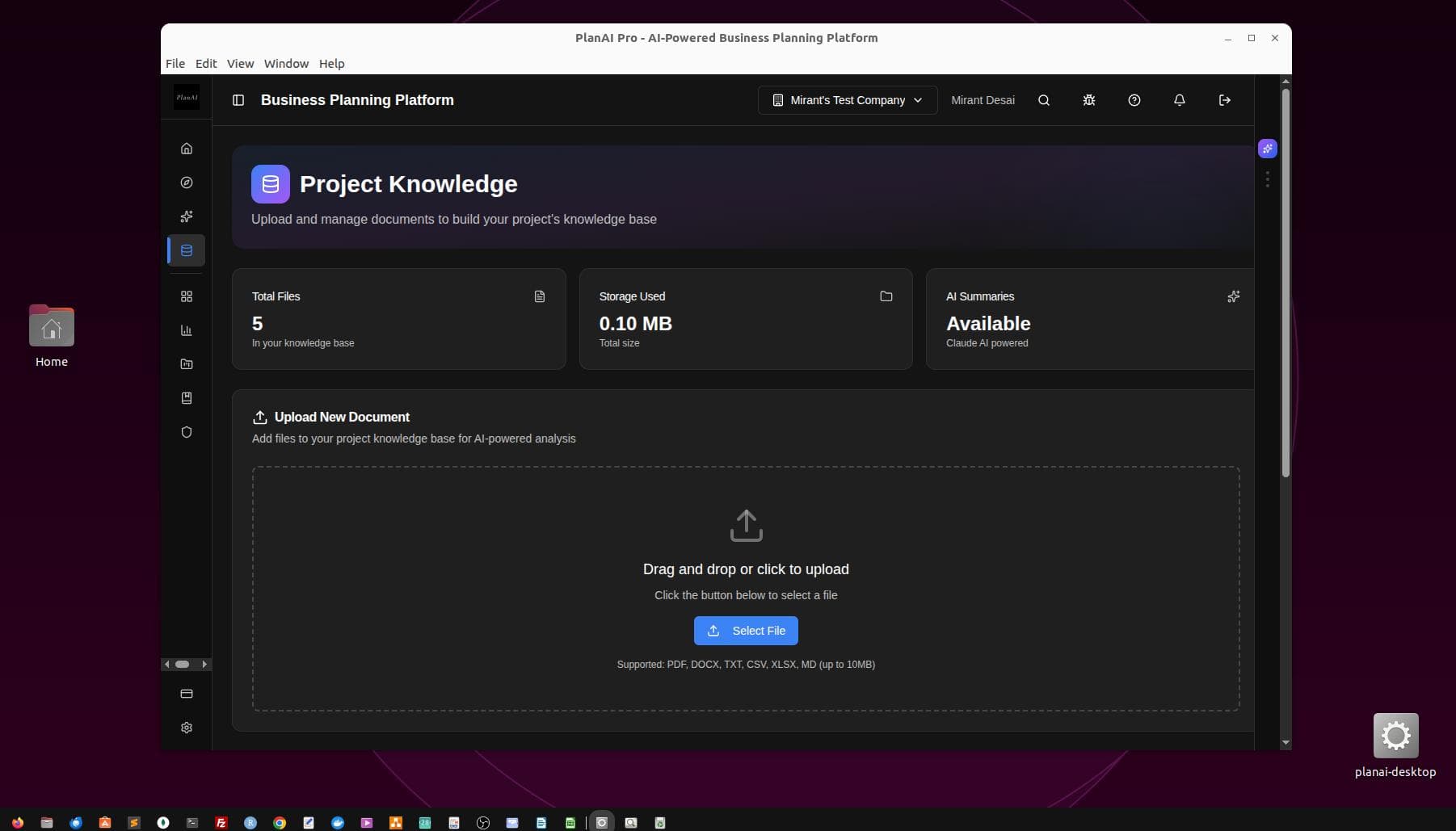
Desktop app interface showing Project Knowledge with drag & drop file upload
Why Desktop?
While our web app provides powerful business planning capabilities from any browser, we heard your feedback: you want native desktop performance, offline access, and the ability to work without internet connectivity. The PlanAI desktop app delivers all of this and more.
Native Desktop Features
🚀 Lightning-Fast Performance
Native code execution means instant load times, smooth animations, and responsive interactions. No browser overhead—just pure performance optimized for your operating system.
📴 Offline Access
Work on your business plans, financial models, and strategic frameworks without internet. All changes sync automatically when you reconnect—perfect for flights, remote locations, or unstable connections.
🔐 Enhanced Security
Local encryption, secure credential storage, and biometric authentication support. Your sensitive business data is protected with enterprise-grade security at the OS level.
🔄 Seamless Cloud Sync
Start work on desktop, continue on mobile, finish on web. All your projects, documents, and AI insights sync instantly across every device where you use PlanAI.
📂 Native File System Integration
Drag and drop files directly from your file explorer. Export business plans to your Documents folder. Native file handling feels natural and integrated with your workflow.
⌨️ Keyboard Shortcuts & Menu Bar
Full native menu bar (File, Edit, View, Window, Help) with customizable keyboard shortcuts. Power users can navigate the entire app without touching the mouse.
Project Knowledge: Supercharged on Desktop
The screenshot above showcases the Project Knowledge module in the desktop app. This feature allows you to build a comprehensive knowledge base for your business by uploading documents, spreadsheets, and files.
What Makes Project Knowledge Powerful:
- ✓AI Summaries: Claude AI automatically analyzes uploaded documents and generates intelligent summaries
- ✓Multi-Format Support: Upload PDF, DOCX, TXT, CSV, XLSX, and MD files (up to 10MB each)
- ✓Drag & Drop: Native file handling makes it effortless to build your knowledge base
- ✓Storage Tracking: Real-time visibility into files uploaded and storage used
- ✓Context for AI: All uploaded files become context for AI-powered business planning features
Full Access to All PlanAI Features
The desktop app isn't a stripped-down version—it's the complete PlanAI experience with native performance. Access every feature you know and love:
Business Planning
AI-powered business plan generation with industry-specific templates
Financial Modeling
5-year projections, P&L forecasts, cash flow, and break-even analysis
Strategic Frameworks
SWOT, Porter's Five Forces, Business Model Canvas, and more
Market Research
AI-powered competitor analysis and market trend identification
Project Knowledge
Upload documents to build AI-accessible knowledge base
Integrations
Google Sheets, Notion, QuickBooks, and more coming soon
AI Assistant
Real-time help powered by Claude AI positioned on right side
Discover Feed
GPT-ranked business intelligence and market insights
Export Options
PDF, DOCX, and presentation-ready formats
System Requirements
Windows
- • Windows 10 or later (64-bit)
- • 4 GB RAM minimum (8 GB recommended)
- • 500 MB available disk space
- • Intel i3 or AMD equivalent
macOS
- • macOS 11 (Big Sur) or later
- • 4 GB RAM minimum (8 GB recommended)
- • 500 MB available disk space
- • Intel or Apple Silicon (M1/M2/M3)
Linux
- • Ubuntu 20.04+ or equivalent
- • 4 GB RAM minimum (8 GB recommended)
- • 500 MB available disk space
- • x64 processor
Pricing & Availability
The PlanAI desktop app is included free with all PlanAI Pro subscriptions ($30/month). There's no additional cost—just download, install, and sign in with your existing PlanAI account.
🎉 Early Access Program
Sign up for PlanAI Pro before April 2026 and get early access to the desktop app beta, plus a chance to influence features and provide feedback directly to our engineering team.
Start 14-Day Free TrialBuilt with Modern Technology
The PlanAI desktop app is built with Electron and Next.js, combining web technologies with native desktop capabilities. This architecture allows us to:
- ✓Ship updates faster: New features and improvements deploy quickly across all platforms
- ✓Maintain feature parity: Web, mobile, and desktop apps stay in sync
- ✓Deliver native experiences: OS-level integrations feel natural on every platform
- ✓Support offline workflows: Local data storage with cloud sync when connected
Download Coming April 2026
We're putting the finishing touches on the desktop app and conducting final testing across all platforms. In April 2026, you'll be able to download the app directly from our website or through platform-specific stores (Microsoft Store, Mac App Store, and Snap Store for Linux).
With the desktop app, you'll have the power of AI-driven business intelligence wherever you work—online or offline.
Ready to Experience Native Performance?
Get notified when the desktop app launches in April. Sign up for early access and start planning your business today.
Related Product News
PlanAI for Individuals: Business Intelligence Platform
New marketing and operations strategy modules with AI assistant positioned on right side for real-time help.
Read more →Discover Feed: AI-Powered Business Intelligence
GPT-ranked news curation and intelligent search for founders. Track trends, analyze competitors, and discover funding opportunities.
Read more →